Preorder Dates for WooCommerce
Pre-order with
two dates,
not one.
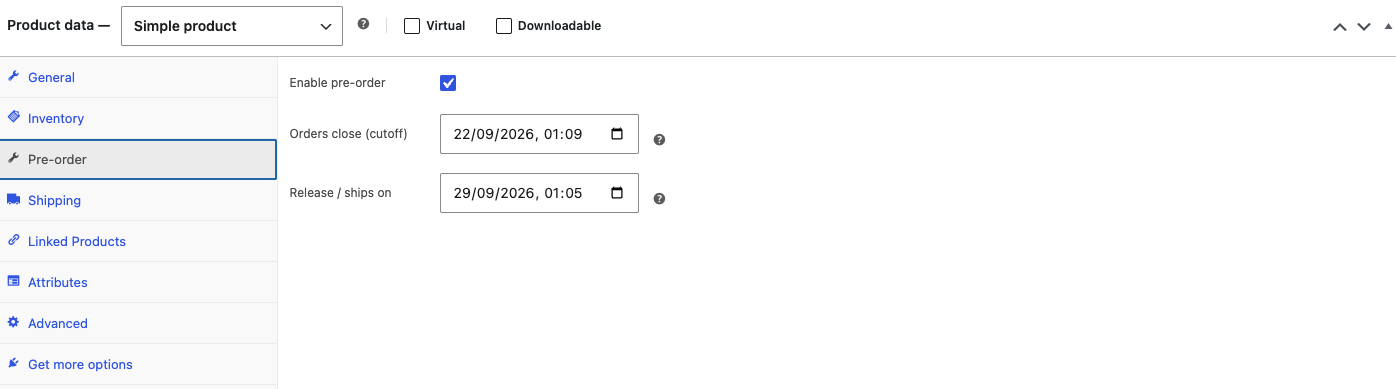
One date for when orders close. A separate date for when the release ships. Set it on the whole product, or on a single variation.
What it does
Two dates. Zero manual cutoff work.
Free on WordPress.org, with everything below already working today.
Two independent dates
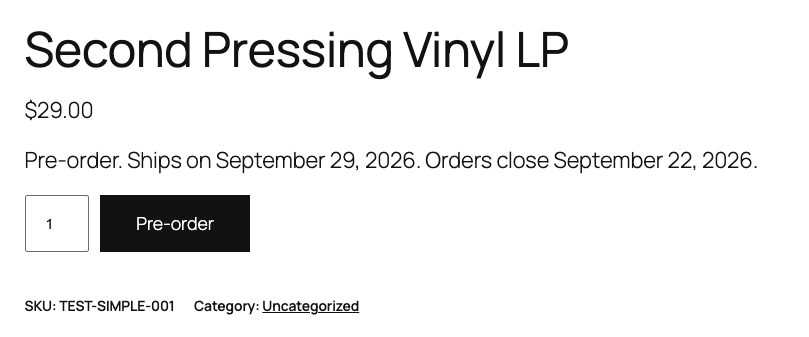
Set a cutoff for when pre-orders stop, and a separate release date for when the item ships. Works on the whole product or on a single variation.
Blocks the sale by itself
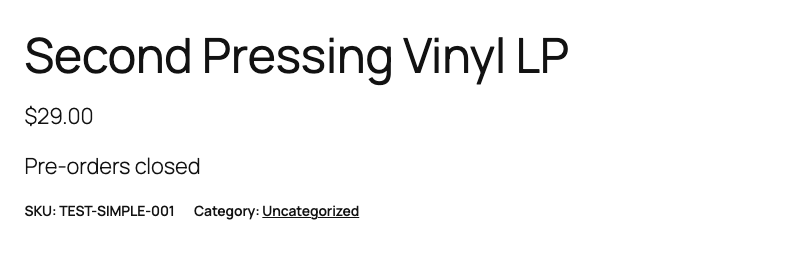
Once the cutoff date and time pass, the product stops being purchasable. Shoppers see your closed message instead of "Add to cart".
Built for HPOS and block checkout
Pre-order validation runs through WooCommerce's Store API, the same code path the cart and checkout blocks use.
More detail
Set once, where you already work.
In the product editor and in WooCommerce settings, nowhere else.
day refund window on Pro. Cancel anytime, no retention pitch.

Per-variation pre-orders
Each variation gets its own cutoff and release date, not just the parent product.

Ships on, right in the cart
The block-based cart shows the release date under every pre-order line.
Custom label, button and closed message
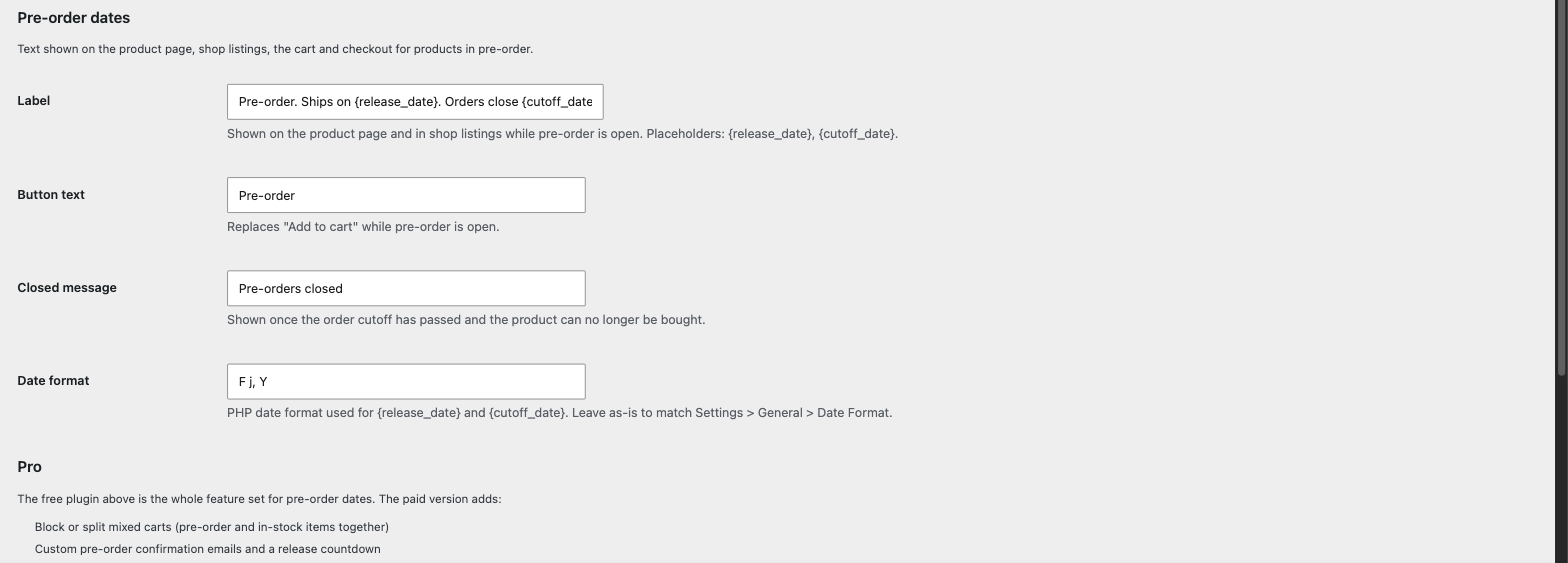
Change what shoppers read on the product page, in shop listings and once pre-orders close. The release and cutoff dates fill in automatically.
No manual step
Nothing to remember. The cutoff enforces itself the moment it passes.
How it works
Three steps, no code
Same screens you already use to set price and stock.
1
Turn on pre-order
Enable it on the product, then set the cutoff and release date.
2
Customize what shoppers see
Label, button text and the closed message, with dates filled in automatically.
3
Let it run
Once the cutoff passes, the product stops being purchasable. No manual step.
By the numbers
Two dates is the whole point.
2
independent dates: cutoff and release, per product or per variation.
$179/year
price of the official WooCommerce Pre-Orders extension, one date field only.
0
plugins we tested, free or paid, that split cutoff and release into two fields.
How it compares
Only the alternatives we could verify
Price and features each one states on its own product page, checked September 2026.
| Preorder Dates for WooCommerce | Official WooCommerce Pre-Orders | Smart Pre-Order Manager | |
|---|---|---|---|
| Price | Free, Pro $9/month or $79/year for 1 site | $179/year, or $286.40 for 2 years | $49/year, or $78.40 for 2 years |
| Independent cutoff and release dates | Yes, in the free version | No, a single "available on" date | No, a single date you can mark "TBA" and update once |
| Per-variation pre-order | Yes, in the free version | Not stated on their product page | Not stated on their product page |
| Mixed-cart control | Pro only | Not stated on their product page | Yes, included |
| Block-based cart and checkout (Store API) | Yes, in the free version | Not stated on their product page | Not stated on their product page |
| Rating, as of September 2026 | New, no reviews yet | 2.9 out of 5 stars, 11 reviews | 4.8 out of 5 stars |
If you only need one date, either alternative above already does that well. If you need the cutoff and the release date to be different, this is the one built around that. Sources: woocommerce.com/products/woocommerce-pre-orders and woocommerce.com/products/smart-pre-order-manager, checked September 2026.
What the free version does not do, yet. No mixed-cart control: pre-order and in-stock items can sit in the same cart today, and Pro adds the option to warn about that or block it. No reminder email: Pro emails the customer a few days before the release date. No bulk editing: moving the dates on many products at once is a Pro feature. Deposits, partial payments and back-in-stock waitlists are out of scope for both versions; pair a dedicated plugin for those.
Simple pricing
Pro, when you need it.
The free plugin already runs pre-orders in production. Pro adds mixed-cart control, a reminder email before the release date, and bulk editing.
Personal
1 site
$9/month $79/year
- Everything in the free plugin
- Mixed-cart control
- A reminder email before the release date
- Bulk edit across your products
Thanks. I will email you the moment Pro launches, no payment collected here.
Business
Up to 5 sites
$19/month $149/year
- Everything in Personal
- On up to 5 of your own sites
- For agencies and stores managing more than one shop
Thanks. I will email you the moment Pro launches, no payment collected here.
If Pro is not right for your store, email [email protected] within 14 days of purchase for a full refund. No form, no retention pitch. Cancel anytime, no setup fee.
FAQ
Questions people actually ask
Yes. The free plugin on WordPress.org already has two independent dates per product and per variation. Pro adds mixed-cart control, a reminder email before the release date, and bulk editing.
The official extension has one date field. This plugin's free version already has two: a cutoff for orders and a separate release date.
Yes. Validation runs through WooCommerce's Store API, the same code the cart and checkout blocks use, not just the classic shortcode checkout.
Yes, declared and tested against it.
In the free version, yes. Nothing stops that today. Pro can either warn the shopper that the whole order then waits for the release date, or block checkout until they split it themselves.
No. Dates are set on the product edit screen, the same place you set price and stock.
Yes, one Pro license per site under the Personal plan, or up to 5 under Business.
Try it now
Ready to stop guessing release dates?
Free plugin, GPL license, open source on GitHub.